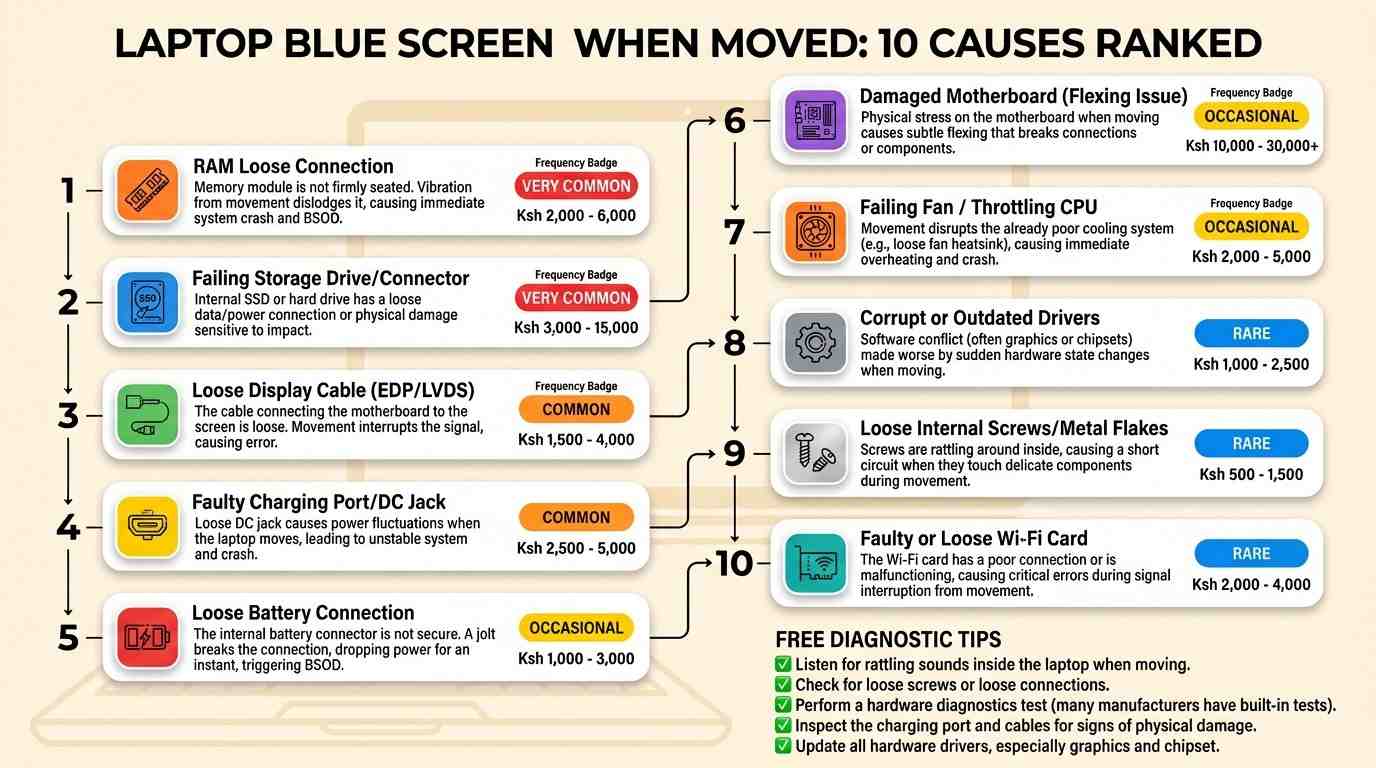
Laptop shows blue screen and restarts when I move it — if that sentence describes your machine exactly, you are dealing with one of the most common laptop complaints in Kenya, and the good news is that it is almost always fixable. This guide walks through every cause, from a loose RAM stick to a cracked motherboard, and tells you exactly how to fix each one, with real repair prices in Ksh for Nairobi.
What You Will Learn
- Why movement triggers a blue screen
- 1. Loose RAM stick
- 2. Loose SSD or hard drive
- 3. Damaged display cable
- 4. Loose charging port
- 5. Loose battery connector
- 6. Cracked motherboard solder joint
- 7. Overheating and dust buildup
- 8. Outdated or faulty drivers
- 9. Loose screws or a warped chassis
- 10. Loose Wi-Fi card
- How to find the exact cause yourself
- Repair cost guide in Ksh
- Repair or replace?
- Back up your data first
- FAQ
Why Movement Triggers a Blue Screen
Inside every laptop, small parts like the RAM, the storage drive, and the display cable connect to the motherboard through slots, clips, or thin ribbon connectors. None of these are glued in place. Over time, or after a small drop, one of these connections can become slightly loose. When the laptop sits still on a flat desk, gravity and pressure hold the loose part in place, so it works fine. The moment you lift the laptop, tilt the screen, or carry it in a bag, the case flexes just a tiny bit. That tiny flex is often enough to break contact for a fraction of a second, and Windows reacts to a sudden hardware disconnect with a blue screen and an automatic restart to protect your files.
This is different from a blue screen that happens randomly while the laptop is sitting still, which usually points to software, a driver, or overheating instead. The fact that yours happens specifically when the laptop moves is actually useful information — it narrows the problem down to a small list of physical connections, which we cover one by one below, ranked from most common to least common in laptops sold and repaired around Nairobi.
The 10 Causes, Ranked From Most to Least Common
Loose RAM Stick Very Common
RAM sticks click into a slot and are held by two small side clips. On many laptops, especially ones that have been opened before for a RAM or SSD upgrade, the clips do not always seat the stick fully. A slight bump while the laptop is being carried is enough to break the contact, which instantly triggers a memory-related blue screen. This is the single most common reason a laptop crashes specifically when it is picked up or moved.
Fix: Power off the laptop, unplug the charger, and if the battery is removable take it out. Open the RAM access panel, gently push out each stick, blow away any dust, and press it firmly back into the slot at an angle until it clicks flat and the side clips lock. Do this for every stick if your laptop has more than one.
Loose SSD or Hard Drive Very Common
Just like RAM, an M.2 SSD sits in a slot secured by one tiny screw, and a 2.5-inch drive connects through a small SATA connector and ribbon cable. If that screw is missing or the connector is not fully pushed in, movement can briefly disconnect the drive. Because Windows depends on the drive every second it runs, this type of disconnect usually causes a longer freeze right before the blue screen, rather than an instant crash.
Fix: Open the back panel and check that the SSD screw is present and tight, or that the SATA cable is firmly seated on both ends. If the drive itself is old and starting to fail, a full replacement is safer than repeated reseating.
Damaged Display Cable Common
The thin ribbon cable that runs from the motherboard through the hinge to the screen bends every single time you open or close the lid. After years of use, this cable can fray or crack at the hinge point. If your blue screen happens specifically when you adjust the screen angle rather than when you carry the whole laptop, this cable is the most likely cause.
Fix: A technician needs to open the lid casing and replace the ribbon cable. This is not a safe do-it-yourself repair because the cable is delicate and easy to tear further.
Loose Charging Port (DC Jack) Common
If your laptop only blue screens when it is plugged in and moved, but is fine while running on battery, the charging port itself may have a loose internal connection. A worn or bent DC jack can momentarily interrupt power delivery when the cable or laptop shifts, and a sudden power interruption can trigger a shutdown that looks like a blue screen crash.
Fix: A technician re-solders or replaces the DC jack on the motherboard. Avoid yanking the charging cable at an angle in the meantime, as this makes the problem worse.
Loose Battery Connector Common
Some crashes that look like a blue screen are actually a sudden power cut caused by a battery that is not fully clipped into its connector. Any small movement can shift the battery just enough to break contact for a moment, especially on older laptops where the battery has started to swell slightly.
Fix: Remove the battery if it is removable, check the connector pins for dirt or corrosion, and reseat it firmly. If the battery is swollen at all, replace it immediately rather than reseating it, since a swollen battery is a safety risk.
Cracked Motherboard Solder Joint Occasional
If you have already reseated the RAM and the storage drive and the problem still happens, the crack may be on the motherboard itself, at a solder joint that has weakened from years of small drops or flexing. This is more common in laptops older than five years or ones that have been dropped in the past, even lightly.
Fix: This requires a skilled technician to inspect the board under magnification and either reflow the solder joint or replace the affected chip. It is one of the more expensive fixes on this list, so it is worth ruling out every simpler cause first.
Overheating and Dust Buildup Occasional
A laptop that is already running hot is more sensitive to small disruptions. Moving it can briefly block a vent, shift a fan slightly, or jolt a loose thermal sensor cable, which is sometimes enough to push an already-hot system over the edge into a protective shutdown. Dust buildup inside the fan and heatsink over months of use makes this far more likely.
Fix: A full internal cleaning with fresh thermal paste on the processor restores normal cooling and removes one of the triggers that makes movement-related crashes worse.
Outdated or Faulty Drivers Occasional
A driver, especially a graphics or storage driver, is software that controls how Windows talks to a piece of hardware. A poorly written or outdated driver can crash the instant it detects a brief hardware disconnect, even one so small it would otherwise go unnoticed. This does not cause the loose connection, but it can turn a harmless flicker into a full blue screen.
Fix: Update your graphics driver, chipset driver, and storage driver to the latest version from the laptop manufacturer's website, then restart and test again.
Loose Screws or a Warped Chassis Rare
If a laptop has been opened for a repair before and a screw was left loose or missing, the internal boards can shift very slightly under pressure. A warped chassis, often from heat damage or a fall, has the same effect, letting internal parts move more than they are designed to.
Fix: A technician opens the base panel, checks that every screw is present and properly tightened, and inspects the chassis for warping that may need a replacement bottom cover.
Loose Wi-Fi Card Rare
The Wi-Fi card is a small module near the RAM, held in place by one tiny screw with two antenna wires clipped onto it. It is rarely the cause, but on laptops that have had the base panel removed before, a loose Wi-Fi card can disconnect briefly during movement and, in some cases, contribute to a driver-level crash.
Fix: While the base panel is open for the RAM check, confirm the Wi-Fi card screw is tight and the antenna cables are clipped in securely.
How to Find the Exact Cause Yourself
Before paying for a repair, you can narrow down the cause with a few simple checks at home. Go through these steps in order.
- Note the exact moment it happens. Does it crash when you lift the whole laptop, when you only tilt the screen, or only while it is charging? Each pattern points to a different cause from the list above.
- Read the stop code. The blue screen shows a short code such as MEMORY_MANAGEMENT or VIDEO_TDR_FAILURE. Write it down or take a photo — it tells you which part is most likely involved.
- Reseat the RAM first. This is free, takes five minutes, and fixes the problem more often than any other single step.
- Run Windows Memory Diagnostic. Press the Windows key and R, type
mdsched.exe, and choose "Restart now and check for problems." This tests your RAM for hardware errors. - Test in Safe Mode. Start Windows in Safe Mode and try the same movements that normally trigger a crash. If it stays stable in Safe Mode, a driver is more likely to blame. If it still crashes, the cause is almost certainly hardware.
- Do a gentle wiggle test. With the laptop running and open, lightly press on the palm rest, the hinge area, and the bottom center while watching the screen for glitches. This can reveal exactly where the loose connection is hiding.
Repair Cost Guide in Ksh
Here is a quick summary of what each fix typically costs at a reputable repair shop in Nairobi. Always ask for a free diagnostic first so you only pay for the part that actually needs fixing.
| Cause | Typical Fix | Price Range (Ksh) |
|---|---|---|
| Loose RAM | Reseat | Free – Ksh 1,000 |
| Loose SSD / HDD | Reseat or replace | Ksh 500 – Ksh 9,000 |
| Display cable | Replace cable | Ksh 2,500 – Ksh 5,000 |
| Charging port | Repair or replace jack | Ksh 3,000 – Ksh 7,000 |
| Battery connector | Reseat or replace battery | Free – Ksh 8,000 |
| Motherboard crack | Reflow or chip repair | Ksh 6,000 – Ksh 15,000 |
| Overheating | Clean + new thermal paste | Ksh 1,500 – Ksh 3,500 |
| Drivers | Update software | Free |
| Loose screws / chassis | Tighten or replace casing | Ksh 500 – Ksh 4,000 |
| Wi-Fi card | Reseat or replace | Free – Ksh 4,000 |
Not sure which part is causing your laptop's blue screen? Send us a message and describe when the crash happens, and we can point you in the right direction.
📲 Ask Us on WhatsAppShould You Repair It or Replace It?
Most of the causes on this list are cheap and quick to fix, so repair is almost always the right first move. But there are a few situations where buying a replacement laptop makes more financial sense.
| Repair Makes Sense | Replace Makes Sense | |
|---|---|---|
| Laptop age | Under 4 years old | Over 6 years old |
| Cause | RAM, SSD, battery, Wi-Fi card, drivers | Motherboard crack on an already old unit |
| Repair cost | Under half the price of a similar used laptop | Close to or more than a similar used laptop |
| Past repairs | First time this laptop has had an issue | Laptop has needed several repairs already |
If you decide replacement is the better option, browse our current stock of tested ex-UK business laptops, which all come pre-checked before sale. See our Best Intel Core i5 Laptops in Kenya guide for reliable budget-friendly picks.
Back Up Your Data Before You Do Anything Else
Frequently Asked Questions
Why does my laptop blue screen only when I move it?
Moving a laptop can flex the case just enough to break contact on a loose part inside, such as a RAM stick, an SSD, a display cable, or a charging port. The blue screen happens the moment that part loses its connection.
Can a loose RAM stick cause a blue screen when the laptop is moved?
Yes. RAM sits in a slot held only by small clips. Movement, especially lifting one corner or a hinge flex, can shift a stick just enough to lose contact, which instantly causes a memory management blue screen.
Is it safe to keep using a laptop that blue screens when moved?
You can keep using it carefully, but you risk sudden data loss during a crash. Back up your files right away and get the loose part checked as soon as possible, since the problem tends to get worse over time.
How much does it cost to fix a laptop that blue screens when moved in Kenya?
Most fixes in Nairobi range from Ksh 500 for a simple RAM reseat to about Ksh 15,000 for a full motherboard repair. A diagnostic check usually costs between Ksh 500 and Ksh 1,500 and tells you exactly which part is loose.
Can I fix a loose RAM stick myself at home?
Yes, on most laptops. Power off the laptop, unplug it, remove the battery if it is removable, open the RAM panel, take out each stick, and press it firmly back into its slot until the side clips lock. Always ground yourself first to avoid static damage.
Should I repair or replace a laptop that keeps blue screening?
If the laptop is under 4 years old and the repair costs less than half the price of a similar replacement, repair is usually the smarter choice. If the motherboard itself is cracked or the laptop is very old, replacing it is often cheaper in the long run.
Still seeing the blue screen after trying these fixes, or want a professional to check it for you? WhatsApp us on 0714701814 and describe when the crash happens — we will help you figure out exactly which part needs attention, and if a replacement makes more sense, we have tested laptops ready to go.
📲 Get Help on WhatsApp