A laptop troubleshooting guide for popular models only works if it looks at the real weak points of each machine, not generic advice that fits every laptop the same way. An HP EliteBook does not fail the same way a MacBook Air fails. A Dell Precision workstation runs into different trouble than a Lenovo Yoga that folds into a tablet. In this guide, we go model line by model line, list the problems Kenyan owners report most, explain the real cause in plain English, and give you the fix — plus what it should cost in Ksh if you need a technician.
Most of these laptops are common in Kenya as ex-UK business machines, because big companies in Europe replace their fleets every few years and sell the used units on. That means understanding these specific model lines matters even more here than in most markets. Let's go through each one.
1. Common HP EliteBook Problems
The HP EliteBook is HP's flagship business laptop, built for office workers who need a tough, secure machine. It is one of the most common ex-UK laptops sold in Nairobi. Here are the problems it runs into most.
HP EliteBook: Top 5 Issues & Fixes
- Battery draining fast or not charging. Old battery cells lose their capacity after 3 to 4 years of daily office use. Open HP Support Assistant and run a battery check. If health is below 50%, replace the battery. Ksh 3,500 – 6,500
- Screen hinge cracking near the bezel. Thin-bezel EliteBook models (like the 840 and 1030 series) have plastic hinge caps that wear out from repeated opening and closing. A technician can replace the hinge kit. Ksh 2,500 – 4,000
- BIOS or admin password lock on an ex-corporate unit. This happens when the previous company's IT department locked the BIOS and never removed it before resale. Always ask the seller to clear this before you buy. If it is already locked, a professional BIOS reset is needed. Ksh 1,500 – 3,000
- Trackpad or clickpad not responding. Usually a Synaptics or HP driver conflict after a Windows update. Update the touchpad driver through Device Manager or the HP website.
- Laptop overheating on 800 and 840 G-series models. Dust builds up in the thin fan housing over time. Clean the vents with compressed air every few months, especially if you use the laptop on a bed or sofa.
2. Common HP ProBook Problems
The HP ProBook is HP's budget-friendly business line, one step below the EliteBook. It is a favourite for students and small offices in Kenya because it is affordable and easy to repair.
HP ProBook: Top 5 Issues & Fixes
- Sticky or missing keyboard keys. Heavy daily typing wears out the key mechanism, especially on older 430 and 450 G-series units. A single keycap can be replaced, or the whole keyboard swapped if several keys fail. Ksh 2,000 – 4,500
- Loud fan noise or grinding sound. Usually dust build-up or a worn fan bearing. Cleaning fixes most cases; a full fan replacement is needed if the grinding continues. Ksh 1,800 – 3,000
- Very slow boot time on older models. Many ProBooks still run on a spinning hard drive (HDD). Upgrading to an SSD is the single biggest speed fix you can make. from Ksh 3,500 for 256GB
- Wi-Fi dropping in and out. Often an outdated wireless driver or a loose antenna cable near the hinge. Update the driver first; if that fails, the antenna needs reseating.
- Charging port feels loose. The DC jack wears out from repeated plugging. A loose port should be replaced before it stops charging completely. Ksh 2,000 – 3,500
3. Common HP ZBook Problems
The HP ZBook is HP's mobile workstation line, built for engineers, video editors, and anyone running heavy design software. It packs a dedicated graphics card, so it runs hotter and has a different set of problems.
HP ZBook: Top 5 Issues & Fixes
- Graphics driver crashing during CAD or rendering work. This is almost always an outdated NVIDIA Quadro driver. Download the latest driver from the NVIDIA or HP support site, not a generic gaming driver.
- Overheating under sustained heavy load. Dust build-up combined with dried-out thermal paste is the usual cause after 2 to 3 years. Cleaning the heatsink and reapplying thermal paste solves it. Ksh 2,500 – 4,000
- Fan running loud and constant. Workstation chips run hotter than normal laptops by design. If the fan never quiets down even at idle, clean the vents and consider a cooling pad.
- Docking station not detected. Usually a firmware mismatch between the dock and the laptop. Update the dock firmware through HP's Dock Manager tool.
- Screen colours drifting from their factory calibration. Common on ZBook Studio models used for design work. Recalibrate the display profile in Windows Color Management.
4. Common Lenovo ThinkPad Problems
The Lenovo ThinkPad is one of the most trusted business laptops in the world, known for its black case and red TrackPoint nub. It is extremely popular in Kenya's ex-UK laptop market.
Lenovo ThinkPad: Top 5 Issues & Fixes
- Battery swelling or bulging. This is a safety issue, not just a performance one. Aging lithium cells can puff up and push the trackpad out of place. Stop using the laptop and have the battery replaced immediately. Ksh 3,500 – 6,000
- TrackPoint (the red nub) cursor drifting on its own. This usually needs recalibration in the Lenovo settings, or a worn TrackPoint cap replaced.
- Function keys behaving in the wrong mode. Toggle the Fn Lock setting in BIOS or press Fn+Esc to switch between media keys and F1–F12 mode.
- Fan whining noise on X1 series laptops. Usually dust in the very thin fan assembly. A clean and, if needed, fan replacement clears the noise. Ksh 2,000 – 3,500
- Wi-Fi or Bluetooth switching off by accident. Check that Airplane Mode has not been toggled on with Fn+F5 or a physical switch on the side of the case.
5. Common Lenovo Yoga Problems
The Lenovo Yoga is a 2-in-1 convertible that folds all the way back into a tablet. Because it has a flexible hinge and a touchscreen, it has a different failure pattern than a standard clamshell laptop.
Lenovo Yoga: Top 5 Issues & Fixes
- Hinge feels loose or wobbly in tablet mode. The 360-degree hinge mechanism wears out from repeated folding. A technician can tighten or replace the hinge assembly. Ksh 3,000 – 5,000
- Touchscreen registering ghost touches. Usually an outdated digitizer driver, or dust and moisture trapped under the glass edge. Update the driver first, then clean the screen edges gently.
- Auto-rotate not working when you flip the screen. The orientation sensor service may be disabled. Turn it back on in Windows Settings under Display.
- Stylus pen not being detected. Check that the pen is paired over Bluetooth and that its small battery is not flat.
- Speaker sound distorted in tent or tablet mode. This is often a software equalizer setting, but can also be dust blocking the speaker grille. Clean gently with a soft brush.
6. Common Dell Latitude Problems
The Dell Latitude is Dell's business-class line, built tough to MIL-STD-810H standards. It is a common sight in Kenyan offices and a popular ex-UK import.
Dell Latitude: Top 5 Issues & Fixes
- Not charging even when plugged in. Test with a different genuine Dell adapter first. If the problem stays, the DC-in board or charging port itself needs replacing. Ksh 2,000 – 3,500
- "Battery not detected" error message. This is a known Dell battery-firmware bug on some Latitude generations. Run Dell SupportAssist battery diagnostics and recalibrate the battery.
- Random shutdowns during use. Often a thermal shutdown from dust build-up, or a failing power adapter that cannot keep up under load. Clean the vents and test with another adapter.
- Fingerprint reader stops working. Usually a driver issue after a Windows update, or Windows Hello needs to be re-enrolled.
- External display not detected through the docking station. Update the Dell dock firmware and the graphics driver together, since they need to match versions.
7. Common Dell Precision Problems
The Dell Precision is Dell's mobile workstation line, built for engineers and 3D artists. Like the HP ZBook, it runs powerful hardware that generates a lot of heat.
Dell Precision: Top 5 Issues & Fixes
- Graphics card throttling (slowing down) during rendering. Degraded thermal paste and dust build-up are the usual causes after 2 to 3 years of heavy use. A clean and repaste restores full speed. Ksh 2,500 – 4,000
- Loud dual-fan noise under heavy load. Some noise under full load is normal for a workstation chip, but constant loud noise even at idle usually means dust or a worn bearing.
- Blue screens or crashes during heavy multitasking. Reseat the RAM sticks and run Windows Memory Diagnostic to rule out a failing memory module.
- Driver crashes in AutoCAD or SolidWorks. Use the Dell or NVIDIA "Studio" or ISV-certified driver, not a general gaming graphics driver, since certified drivers are tested against these programs.
- Battery draining unusually fast. Precision laptops with high-capacity ECC RAM draw more power. Set Windows to a Balanced or Power Saver plan when not doing heavy work.
8. Common Dell XPS Problems
The Dell XPS is Dell's premium consumer ultrabook, known for its thin design and bright screen. Because it is built so thin, it has a few problems that thicker business laptops rarely see.
Dell XPS: Top 5 Issues & Fixes
- High-pitched coil whine noise. A small amount can be normal under load on some units, but a loud constant whine even at idle usually points to a power delivery issue that needs checking.
- Screen flickering on 4K or OLED display models. Usually a graphics driver and refresh-rate mismatch. Update the Intel or NVIDIA graphics driver to the latest version made for that exact model.
- Fan spinning up loudly even during light tasks. The XPS's thin chassis means thermal paste dries out faster than on thicker laptops. A repaste usually solves this. Ksh 2,500 – 4,000
- Keyboard backlight not turning on. Check the Fn key backlight toggle first, then update the keyboard driver if that does not work.
- Webcam not detected during video calls. Some XPS models have a physical privacy shutter switch above the camera. Check that it is not covering the lens, then check the camera driver.
9. Common MacBook Air Problems
The MacBook Air is Apple's lightest laptop, popular with students and creatives. It runs macOS, so troubleshooting looks a little different from a Windows laptop.
MacBook Air: Top 5 Issues & Fixes
- Battery health degraded below 80%. This is normal after 3 to 4 years of daily charging cycles. Check the exact number under System Settings > Battery, then replace the battery at an Apple-authorised shop if it is very low. Ksh 6,500 – 9,500
- Laptop not charging through the USB-C or MagSafe cable. Test with a different genuine Apple charger and cable first, since third-party cables are the most common cause.
- Keys sticking or not registering (2018–2019 butterfly keyboard models). Dust trapped under the key mechanism is the usual cause. A professional clean or, in bad cases, a full keyboard replacement is needed.
- Spinning rainbow wheel and general slowness. Open Activity Monitor to find the app using too much CPU, free up storage space, then reset the SMC and NVRAM if it continues.
- No sound from the speakers. Check for a Bluetooth device still connected in the background, then reset the PRAM if the sound stays muted.
10. Common MacBook Pro Problems
The MacBook Pro is Apple's professional line, built for video editors, developers, and designers. Its extra power brings its own set of heat and hardware issues.
MacBook Pro: Top 5 Issues & Fixes
- Thermal throttling (slowing down) during video export. Clean the internal fans and check Activity Monitor for a runaway background process eating up CPU before assuming it is a hardware fault.
- "Disk not readable" errors or startup problems on T2-chip models. Run Apple Diagnostics first (hold D at startup). Some cases need logic board level service from a qualified technician.
- Flickering or "stage light" effect on the screen (2016–2017 16-inch models). This is a known display cable issue on that generation. Apple has run repair programs for some affected models, so it is worth checking eligibility before paying for a private repair.
- Battery stopping at 80% and not charging to 100%. This is often intentional battery health management in recent macOS versions, not a fault. Check System Settings > Battery > Battery Health to confirm.
- Trackpad clicking or registering presses on its own. Reset the SMC first, then check for dust or debris trapped under the trackpad edge.
General Diagnostic Steps Before You Call a Technician
Whatever brand you own, always work through these steps first. They solve a surprising number of "broken" laptops for free.
- Restart the laptop fully, not just sleep mode.
- Test with a different charger or cable if it is a power problem.
- Check Windows Update or macOS Software Update for pending driver fixes.
- Boot in Safe Mode (Windows) or Safe Boot (Mac) to rule out a software conflict.
- Open Task Manager or Activity Monitor to check for a runaway app.
- Clean the vents with compressed air if the laptop is hot or loud.
If the problem stays after these steps, it is almost always a hardware fault, and you should book a proper diagnostic rather than keep guessing.
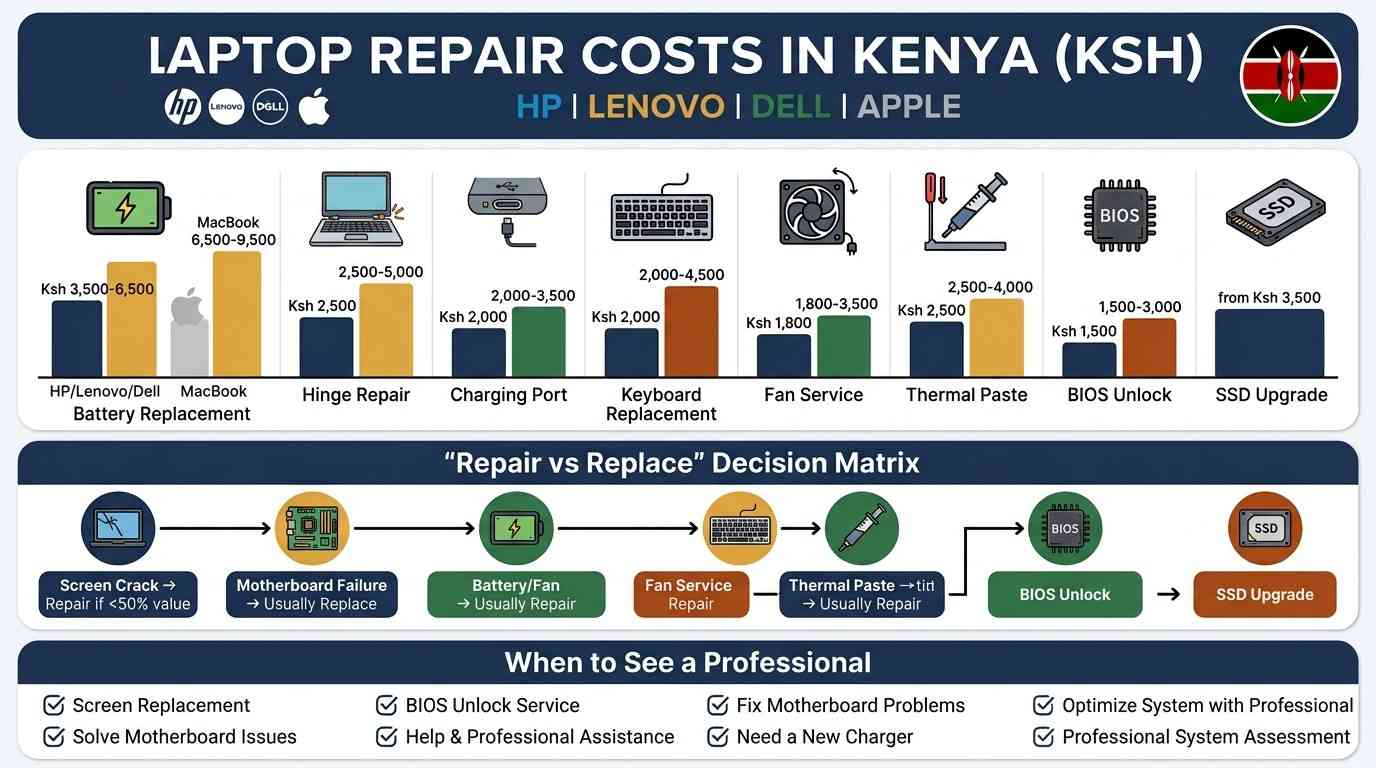
Ksh Repair Cost Table for Popular Laptop Models
Use the search box to filter by repair type. All prices are estimates for Nairobi and can change depending on the exact model and part availability.
| Repair Type | Applies To | Typical Ksh Cost |
|---|---|---|
| Battery replacement | HP, Lenovo, Dell (Windows models) | Ksh 3,500 – 6,500 |
| Battery replacement | MacBook Air / Pro | Ksh 6,500 – 9,500 |
| Hinge repair or replacement | EliteBook, Yoga, XPS | Ksh 2,500 – 5,000 |
| Charging port / DC-in repair | ProBook, Latitude | Ksh 2,000 – 3,500 |
| Keyboard replacement | ProBook, MacBook Air | Ksh 2,000 – 4,500 |
| Fan cleaning / replacement | ThinkPad, ZBook, Precision | Ksh 1,800 – 3,500 |
| Thermal paste repaste | ZBook, Precision, XPS | Ksh 2,500 – 4,000 |
| BIOS / admin password unlock | EliteBook, Latitude (ex-corporate) | Ksh 1,500 – 3,000 |
| SSD upgrade (256GB) | ProBook and older HDD models | from Ksh 3,500 |
| Logic board diagnostic fee | MacBook Pro | Ksh 2,000 – 3,500 |
Repair vs Replace: When Is It Worth Fixing?
Not every problem is worth repairing, especially on an older laptop. Use this table as a rough guide.
| Situation | Repair | Replace |
|---|---|---|
| Battery, keyboard, fan, or charging port fault | ✅ Usually cheap and worth it | Only if the laptop is 6+ years old |
| Cracked screen or broken hinge | ✅ Worth it on business/workstation models | Consider if repair cost is over 50% of resale value |
| Logic board or motherboard failure | Only if under warranty | ✅ Usually cheaper to buy a refurbished replacement |
| Laptop is 7+ years old with multiple faults | Rarely worth it | ✅ A refurbished ex-UK unit often costs less than a full repair bill |
If you decide replacing makes more sense, our refurbished laptops guide covers what to check before buying a used unit, including battery health and warranty terms.
Frequently Asked Questions
What is the first thing I should do when my laptop won't turn on?
Hold the power button for 15 seconds to force a shutdown, then plug in the charger and try again. If nothing happens, test with a different charger before assuming the laptop itself has failed.
How do I know if the problem is the battery or the charger?
If the laptop powers on and works normally while plugged in but dies the second you unplug it, the battery is the problem. If it will not turn on even while plugged in, test the charger on another laptop first.
Are ex-UK laptops harder to troubleshoot than new ones?
Not really. Most ex-UK business laptops (EliteBook, Latitude, ThinkPad) are actually easier to repair because parts are common and the design is built for long-term office use. The main extra step is checking for a leftover BIOS lock from the previous company.
When should I stop troubleshooting and see a professional?
If you have restarted the laptop, tested the charger, updated drivers, and cleaned the vents, and the problem is still there, it is time for a proper diagnostic. This is especially true for a swollen battery, which should never keep being used.
Do MacBooks need a different repair shop than Windows laptops?
Yes, ideally. MacBooks use different tools, parts, and software (like Apple Diagnostics) than Windows laptops. Look for a shop that specifically advertises Apple-certified or Apple-experienced technicians.
Can I fix a swollen battery myself?
No. A swollen battery should be removed and replaced by a trained technician only. Do not puncture it, bend it, or keep charging the laptop while the battery is visibly puffed up.
How much does laptop repair cost on average in Kenya?
Most common repairs — battery, keyboard, fan, or charging port — fall between Ksh 1,800 and Ksh 6,500. MacBook repairs tend to sit at the higher end because parts and specialist labour cost more.
Get Your Laptop Checked the Right Way
Whichever model you own, the fastest way to solve a laptop problem is matching it to the pattern that model line is known for, then confirming with a proper diagnostic before you spend money. If you are unsure whether your laptop is worth repairing or replacing, message us on WhatsApp with the model and the problem, and we will give you honest advice.
📲 Ask About Your Laptop on WhatsApp